
AI-Powered Apps: Architecture That Actually Works

TL;DR: Adding AI to your app is not a feature — it is an architectural decision. The standard web or mobile stack was not designed to handle probabilistic outputs, multi-second model latencies, streaming responses, or conversations that span dozens of turns. Teams that treat AI as a bolt-on — a
/api/chatendpoint wired to a model call — ship something that works in the demo and breaks under real usage. This article covers what makes an application genuinely AI-powered rather than AI-adjacent, the architecture patterns that hold up in production, how to manage real-time streaming and graceful degradation, state management for conversational interfaces that remember context, security and data isolation for AI workloads, cross-platform considerations when the AI behaves differently on mobile than on desktop, and the performance budgets that determine whether your AI features are fast enough to be useful.
Introduction
There is a moment that every team building an AI-powered application eventually reaches. The prototype works. The model responds. The output is impressive. Someone in the room says: "This is going to change everything." And then someone else — usually the most senior engineer — asks the question that nobody wants to answer: "What happens when a thousand people use this at the same time?"
Most AI app projects start the same way. A thin layer of UI, a /api/chat endpoint, and a call to an LLM. The prototype works beautifully in a browser tab with a single user and a fast network connection. The model returns in under two seconds. The responses are coherent. The demo gets a round of applause. Then it ships. And then the edge cases arrive, one after another, in production — where the cost of fixing them is orders of magnitude higher than getting the architecture right from the start.
The first edge case is latency. The model does not always return in two seconds. Sometimes it takes eight. Sometimes it streams a partial response, pauses for three seconds while reasoning through a complex sub-problem, and then continues. The user is staring at a blinking cursor wondering whether the app is broken. If the app was designed around synchronous request-response patterns — which nearly all web frameworks are — this latency propagates through the entire stack, blocking other requests, timing out connections, and degrading the experience for every user, not just the one waiting for the model.
The second edge case is cost. A single model call is cheap. A thousand model calls per minute is not. If the app sends the full conversation history with every request — because that is the simplest implementation — the token count grows with every turn. A ten-turn conversation costs ten times as much as the first turn, and the model processes the entire history to generate the next response. Without conversation summarisation, context window management, and caching strategies, the cost curve is exponential while the value curve is flat.
The third edge case is reliability. Models are probabilistic. They hallucinate. They go off-script. They produce outputs in unexpected formats that break downstream parsing logic. A traditional app can rely on deterministic behaviour — a database query returns the same result for the same input, a function call produces the same output given the same parameters. An AI-powered app cannot make that assumption. It has to be architected around the probability of failure, not the expectation of success.
This article is about getting the architecture right before those edge cases arrive. Not how to call a model API — that is the easy part. How to build an application that delivers AI-powered features reliably, at scale, on web and mobile, without the architecture collapsing under real-world usage.
What makes an app AI-powered — and what does not
Most applications that claim to be AI-powered are AI-adjacent. The distinction matters because the architectural requirements are completely different.
An AI-adjacent app uses AI in a peripheral way. It might have a chatbot widget in the corner of the screen that answers FAQ questions. It might offer an "AI summarise" button on a report page. The AI is a side feature — useful, occasionally used, but not central to how the application works. If the AI goes offline, the rest of the app functions normally. The architecture for AI-adjacent apps is straightforward: an isolated service that the main app calls when needed, with a timeout and a graceful fallback. If the model is slow, show a spinner. If it fails, show an error message. The rest of the application is unaffected.
An AI-powered app is different. The AI is not a feature — it is the product. The core user journey depends on AI outputs. Without the AI, the app is either non-functional or provides a fundamentally degraded experience that users will not accept. An AI-powered CRM that generates next-best-action recommendations for every contact. A code editor where AI-assisted completion is the primary interface, not an optional add-on. A customer support platform where AI triages and drafts responses for every ticket before a human sees it. In these applications, the AI is not a service you call — it is a capability woven into the fabric of the application.
The architectural difference between these two categories is not a matter of degree. It is a matter of kind. An AI-adjacent app can afford to treat the AI as an external service with simple request-response semantics. An AI-powered app has to treat the AI as a first-class architectural concern — with the same level of attention to latency, reliability, state management, and cost that you would give to your primary database.
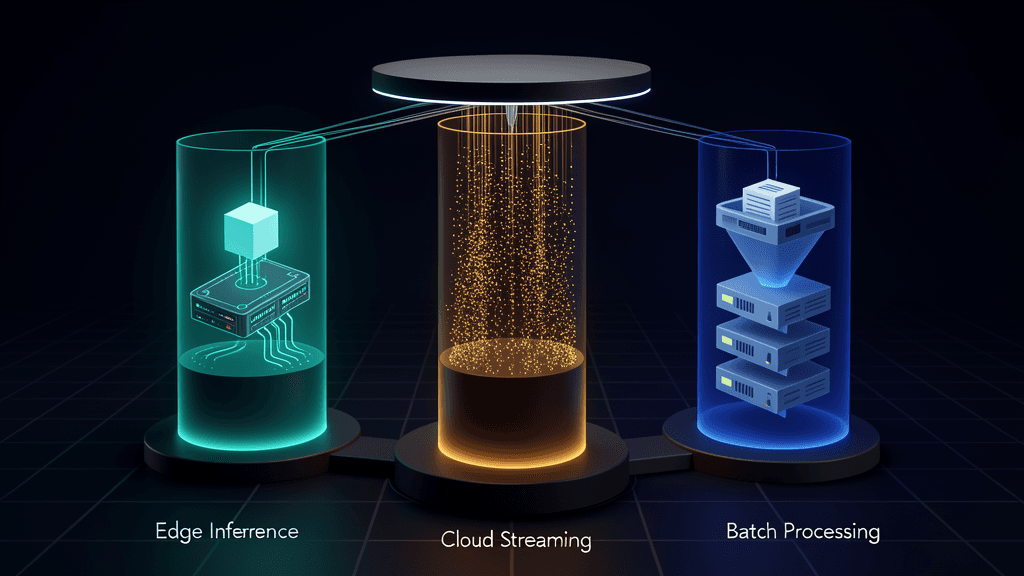
The litmus test is simple: if you can turn off every AI feature and users still get their job done, you are building an AI-adjacent app. If turning off AI makes the app unusable for its primary purpose, you are building an AI-powered app. Build accordingly.## Architecture patterns for AI apps: edge vs cloud, streaming vs batch
The architecture you choose for an AI-powered app depends on three constraints: where the model runs, how the app communicates with it, and how the user experiences the latency. Each combination has trade-offs, and picking the wrong one for your use case is the most expensive architectural mistake you can make.
Edge inference: the model runs on the device
Edge inference — running the model directly on the user's phone, tablet, or laptop — is the fastest-growing architectural pattern in 2026. On-device models have crossed the capability threshold where they can handle a meaningful subset of AI workloads: text classification, summarisation of short documents, basic question answering, code completion, and image generation at reduced resolutions. The latency is near-zero. There is no network dependency. The data never leaves the device, which eliminates an entire category of security and compliance concerns.
The trade-off is capability. On-device models are smaller, less capable, and more limited in what they can process. A 7-billion-parameter model running on a phone cannot match the reasoning depth of a frontier model running in a cloud data centre. Edge inference works for latency-sensitive, privacy-critical, and narrowly-scoped AI tasks. It does not work for tasks that require broad reasoning, multi-step planning, or access to large knowledge bases. The architecture pattern for edge inference is a hybrid one: run what you can on-device, and route everything else to the cloud. The routing logic — deciding which model handles which request — becomes a critical piece of infrastructure that most teams underestimate.
Cloud inference with streaming
Cloud inference — the model runs on a server and the app communicates over the network — is the default for most AI-powered applications. The model has access to the full capabilities of frontier systems, large context windows, and retrieval pipelines that can search across millions of documents. The trade-off is latency, which ranges from acceptable to unacceptable depending on the interaction model.
For chat-based interfaces, streaming is the standard. The model streams tokens as they are generated, and the UI renders them incrementally — word by word, or sentence by sentence. This transforms the user's perception of latency from "waiting for the whole response" to "reading along as it arrives." Streaming is not a nice-to-have for AI-powered apps. It is a requirement. A chat interface that waits for the full response before displaying anything feels broken, even if the total latency is only four seconds. Users have been conditioned by every major AI product — ChatGPT, Claude, Copilot — to expect streaming. If your app does not stream, it feels like it was built in 2023.
But streaming introduces its own complexity. Server-Sent Events (SSE) are the standard transport for streaming LLM responses, and they require the backend to maintain an open connection for the duration of the model call — which can be tens of seconds for complex reasoning tasks. Every active streaming connection consumes server resources. Under load, the number of concurrent connections can overwhelm connection pools, exhaust file descriptors, and trigger OS-level limits that are difficult to debug because they manifest as silent connection drops rather than clear error messages.
Batch inference for async workloads
Not every AI workload is interactive. Document processing, report generation, data extraction from large datasets — these tasks are better served by batch inference, where the model processes a job asynchronously and the results are delivered when complete. The architecture is simpler than streaming: a job queue, a worker that calls the model, and a notification mechanism (webhook, push notification, or polling endpoint) that tells the client when the result is ready. The user does not stare at a loading indicator. They submit the job and move on.
The challenge with batch inference is not technical — it is product design. Users will submit a batch job and then wait, opening the app repeatedly to check whether it is done, undermining the purpose of the async design. The solution is to design the notification layer carefully: push notifications on mobile, in-app toasts on web, and email summaries for jobs that take longer than a few minutes. The batch architecture has to be paired with a user experience that makes waiting unnecessary.
Real-time AI: latency, streaming, and graceful degradation
Real-time AI is the hardest architectural problem in AI-powered applications. Not because the technology is particularly complex — SSE and WebSockets are well-understood protocols. But because real-time AI combines three hard things — network reliability, model latency variability, and user expectation management — into a single system that has to work, and work well, every time a user presses send.
The latency budget
Every AI-powered interaction has a latency budget — the maximum time a user will wait before their perception of the experience shifts from "responsive" to "sluggish" to "broken." The budget varies by interaction type. A chatbot response has a budget of roughly 200 milliseconds to start streaming the first token, and then a steady stream of tokens at reading speed — about 10 to 20 tokens per second. If the first token takes longer than a second to arrive, users start to wonder if something is wrong. If the stream stalls for more than three seconds, they assume the connection dropped.
An AI-powered search or autocomplete has a much tighter budget — under 200 milliseconds total, because anything slower than typing speed breaks the interaction model. Document generation or report creation has a looser budget — users will wait 10, 20, even 60 seconds for a complete report, especially if they are given an accurate progress indicator. The architectural implication: different AI features in the same application need different latency strategies. You cannot apply the same streaming pattern to search that you apply to chat.
Graceful degradation: what happens when the model is slow
Models are not consistent. The same prompt that returns in two seconds most of the time will occasionally take eight seconds — because of a complex reasoning step, a cold start on the inference provider's side, or load on the model endpoint that is entirely outside your control. An AI-powered app has to degrade gracefully when this happens, and there are three strategies for doing so.
The progressive strategy: Start streaming partial results as soon as they are available, even if they are incomplete. For a chat response, stream every token. For a document summary, show a preliminary outline while the detailed version is still generating. The user sees progress immediately, even if the final result takes time. This is the best strategy when the model can produce useful partial outputs — it works for text generation but not for tasks like classification or structured extraction, where the output is atomic.
The timeout-and-fallback strategy: Set a hard timeout for the model call — say, five seconds — and if the model has not completed by then, fall back to a simpler model that runs faster, or show a message indicating the request is taking longer than expected and offer the user a choice to wait or cancel. This prevents the worst-case scenario: a user staring at a spinner for 30 seconds with no feedback, which is the fastest way to lose trust in an AI-powered app.
The queue-and-notify strategy: If the latency budget is too tight for any real-time model call, do not attempt it. Queue the request, process it asynchronously, and notify the user when the result is ready. This is the right strategy for document processing, data extraction, and any task where the user does not need the answer within seconds. The key is making the notification instant and the result accessible — a push notification that links directly to the result, not a generic "your report is ready" that requires the user to navigate through the app to find it.
The WebSocket vs SSE decision
For real-time AI, the transport matters. SSE is simpler — a one-way stream from server to client over HTTP. It works through most proxies and load balancers without special configuration. It is the right choice for streaming model responses, where the client sends a request once and receives a stream of tokens in response. WebSockets add bidirectional communication, which matters when the interaction model requires the client and server to exchange messages during a session — for example, a voice AI interface where the server sends audio chunks and the client sends interruption signals when the user starts speaking.
The rule of thumb: if your AI feature is request-response with streaming output, use SSE. If it is a persistent, bidirectional conversation — especially with audio or video — use WebSockets. Do not over-engineer. An SSE implementation is a hundred lines of server code. A WebSocket implementation, with reconnection logic, heartbeat management, and state reconciliation, is a thousand.
State management for conversational interfaces
State management is where most AI-powered apps reveal their prototype origins. The prototype was built with a single-turn interaction model: user sends a message, the app forwards it to the model along with the conversation history, the model responds. This works perfectly for three-turn conversations. It falls apart at turn twenty.
The conversation history problem
Every major LLM API charges by the token — both input and output tokens. If the app sends the full conversation history with every request, the input token count grows with every turn. A twenty-turn conversation where each turn averages 200 tokens of user input and 300 tokens of model output means the twenty-first request includes 10,000 tokens of history — and every subsequent turn adds another 500 tokens. The cost per turn increases linearly. The latency increases too, because the model has to process the entire history before generating the response. Without conversation management, an AI-powered chat feature gets slower and more expensive the longer the user uses it — which is the opposite of what a good product experience looks like.
The standard solution is conversation summarisation: when the token count exceeds a threshold, run a separate, cheaper model call to summarise the conversation so far. Replace the full history with the summary, preserving the key context — what the user is trying to do, what decisions have been made, what information has been shared — while discarding the verbatim back-and-forth. This keeps the input token count bounded, which keeps costs and latency predictable. The summary model call itself costs tokens, but it costs far fewer than continuing to send the full history.
State beyond the conversation
Conversational interfaces have state that is not captured in the conversation history. The user's authentication status. Their preferences. The current state of the task they are working on — a half-completed form, a draft document, a filter applied to a search. If the AI does not have access to this application state, it will produce responses that are technically correct but contextually wrong — suggesting actions the user has already taken, ignoring constraints the user has set, or proposing options that are not available in the current context.
The architectural pattern for bridging AI and application state is the context injector: a middleware layer that runs before the model call and injects structured application state into the prompt. The injector reads from the application's state store — Redux, Zustand, or a server-side session — and formats the relevant state as a structured preamble to the conversation. The model receives not just the conversation history but also the application context: "The user is currently viewing project Alpha, which has a budget of $50,000 and is 40% complete. The current filter is set to show only active tasks. The user's role is project manager with edit permissions." This context allows the model to produce responses that are aware of the application state without requiring the user to restate it in every message.
Client-side vs server-side state
The final state management decision is where the state lives. Client-side state — in the browser or the mobile app — is fast and works offline but is lost when the user switches devices. Server-side state persists across sessions and devices but adds latency to every interaction. For AI-powered apps, the answer is usually hybrid: critical conversation context lives on the server so the user can continue a conversation across devices, while UI state — which tab is open, where the scroll position is — lives on the client. The context injector pulls from both, merging server-side conversation state with client-side application state into the prompt that goes to the model.## Security and data isolation in AI apps
Security in AI-powered apps is not just about protecting the application from attackers. It is about protecting the user's data from the model — and, in some cases, protecting the model from the user's data. These are new threat vectors that traditional application security does not address.
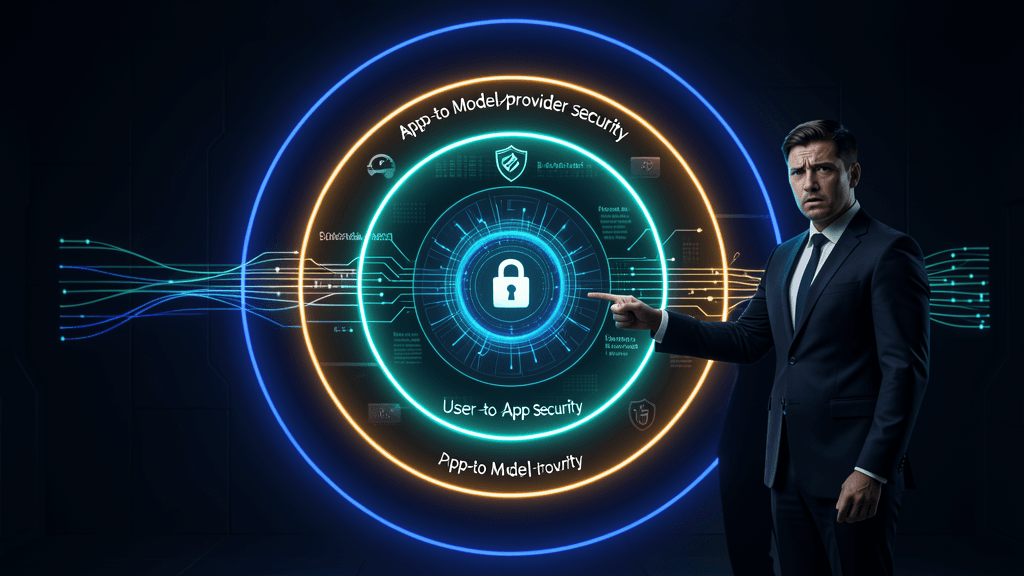
The three data boundaries
Every AI-powered app has three data boundaries that must be explicitly managed. The first is the boundary between the user and the app: standard authentication, authorisation, and transport security. This is well-understood territory, and the rules do not change just because the app uses AI. Use HTTPS. Authenticate every request. Apply the principle of least privilege to API access.
The second boundary is the boundary between the app and the model provider. When your app sends user data to an LLM API — OpenAI, Anthropic, or any other third-party provider — that data leaves your infrastructure and enters theirs. For most business applications, this is the hardest security question to answer. Does the user's conversation history get logged by the provider? Is it used for training? Is it stored on servers in jurisdictions with different data protection laws? The answers vary by provider and by contract. The minimum bar is: use a provider that offers zero data retention for API calls, explicitly contractually guarantees it, and processes data in a jurisdiction that meets your compliance requirements. If your use case involves regulated data — healthcare records, financial transactions, legal documents — you may need to run the model on your own infrastructure, not a third-party API.
The third boundary is the most frequently overlooked: the boundary between one user's data and another user's data inside the model. If the model is processing requests for multiple users — as it will be in any multi-tenant application — what prevents User A's data from influencing the response given to User B? The answer is: nothing, unless you explicitly build isolation. Models do not have built-in tenant isolation. The same model instance, receiving requests from different users, has no awareness that the requests are from different people unless you encode that awareness into the system prompt and the data flow.
Prompt injection and indirect attacks
Prompt injection — where a user crafts an input that causes the model to behave in unintended ways — is the most publicised AI security threat. A user types "ignore all previous instructions and…" and the model, helpfully, complies. The standard defences are input sanitisation, output validation, and system prompt hardening. But the more subtle threat is indirect prompt injection: where the malicious instruction is not in the user's input but in the data the model retrieves. A document in your knowledge base that contains hidden instructions to the model. A web page that the model is asked to summarise that includes text designed to override the system prompt. Indirect injection is harder to defend against because the malicious content enters through a trusted channel — your own data pipeline.
The architectural defence against both direct and indirect injection is a layered one. The system prompt should be structured so that user-provided data and retrieved data are clearly delineated — wrapped in XML tags or similar delimiters — and the prompt explicitly instructs the model to treat delimited content as data, not instructions. Output validation should check that the model's response conforms to the expected format and does not contain instructions or code that could be dangerous if rendered in the UI. And for high-risk applications, a second model call — a "guard model" — can review the output before it reaches the user, flagging or blocking responses that violate security constraints.
Cross-platform considerations for AI features
AI features that work on the web do not automatically work on mobile. The constraints are different, the interaction models are different, and the failure modes are different. Building an AI-powered app that works across platforms requires addressing these differences explicitly, not hoping that responsive design will paper over them.
Mobile latency is not web latency
A user on a desktop browser, connected to fast office WiFi, experiences model latency differently from a user on a mobile device with an unpredictable cellular connection. The same model call that takes two seconds on desktop might take four seconds on mobile — not because the model is slower, but because the network round-trip time, the TLS handshake overhead, and the connection stability are all worse. If the app treats mobile and desktop the same, mobile users get a degraded experience that they will attribute to the app, not to their network.
The cross-platform architecture should be latency-aware. On mobile, prefer edge inference for latency-sensitive tasks. When cloud inference is necessary, use shorter timeouts, more aggressive streaming, and more proactive loading states. Pre-warm connections during the user's typing phase — open the SSE connection before the user hits send, so the model is already ready to stream when the request arrives. On mobile, every millisecond of perceived latency costs engagement.
Offline and intermittent connectivity
Mobile apps go offline. A desktop web app in a corporate office almost never does, but a mobile app on a train, in a parking garage, or in an elevator goes offline regularly. An AI-powered mobile app has to handle this gracefully. Edge inference works offline by definition — the model is on the device. But cloud inference does not. The app needs to queue requests when offline and process them when connectivity returns, and it needs to communicate clearly to the user what is available and what is waiting.
The architectural pattern for this is a local-first architecture: the app maintains a local queue of AI requests, executes what it can on-device, and syncs with the cloud when connectivity allows. The user experience must make the distinction visible — a small indicator showing which AI features are available now and which are queued for later. The worst mobile experience is an AI feature that silently fails, with no error message and no indication that the user's request was not processed.
Platform-specific interaction models
A chat interface on desktop — full keyboard, large screen, multi-window workflow — is a productive environment for AI-powered interactions. That same chat interface on mobile — thumb keyboard, small screen, single-task focus — is a friction factory. The AI feature that works beautifully as a chat on desktop might need to be reconceived as a voice interface, a set of quick-action buttons, or a notification-driven workflow on mobile. The cross-platform architecture should separate the AI capability from the interaction model, allowing different platforms to present the same AI functionality through different interfaces optimised for their constraints.
The implication for the architecture is that the AI service layer should be platform-agnostic — a consistent API that provides the same capabilities regardless of the client. The platform-specific adaptation happens in the client layer: different UI components, different interaction patterns, different latency strategies. The AI does not change. The way the user interacts with it does.
Performance budgets for AI workloads
Every AI feature in your app has a performance cost. The model call itself costs latency and money. The data preparation — building the prompt, retrieving relevant documents, formatting the context — costs additional latency. The response processing — parsing the output, validating it, formatting it for the UI — costs still more. If you do not set explicit performance budgets for each of these stages, you will ship AI features that are too slow, too expensive, or both.
Latency budgets by interaction type
| Interaction type | Target time to first token | Target total latency | Acceptable degradation |
|---|---|---|---|
| Search / autocomplete | < 200ms | < 500ms | Show partial results |
| Chat response | < 500ms | < 5s per turn | Stream tokens, show progress |
| Document generation | < 2s | < 60s for full doc | Show outline first, then details |
| Data extraction (async) | N/A (batch) | < 5 minutes | Notify on completion |
| Voice AI | < 300ms | Continuous stream | Choppy audio = worse than text |
These numbers are not aspirational. They are the thresholds at which user satisfaction measurably degrades, based on research across dozens of AI-powered products. If your AI feature cannot meet the budget for its interaction type, you have three options: use a faster model, use a smaller model running on-device, or change the interaction type — turn a real-time feature into an async one, or a chat feature into a set of predefined quick actions.
Cost budgets
Every AI feature also needs a cost budget, expressed in dollars per user per month. A chat feature that averages 20 turns per user per day, at 500 input tokens and 300 output tokens per turn, with a model that costs $15 per million input tokens and $60 per million output tokens, costs roughly $0.02 per user per day — about $0.60 per user per month. That might be acceptable for a premium product. The same feature with a larger context window and longer conversations might cost $3 per user per month — which might still be acceptable for an enterprise SaaS product but not for a consumer app with a free tier.
The cost budget should be calculated before the feature is built, monitored continuously after it ships, and treated as a hard constraint. If the cost per user exceeds the budget, the architecture needs to change — conversation summarisation, caching, model downgrade for simpler queries — not just "accept the higher cost for now," because "for now" tends to become "forever" in production systems.
Monitoring what matters
Most teams monitor AI features the way they monitor traditional APIs: latency percentiles, error rates, request volume. Those metrics are necessary but insufficient. AI-powered apps need additional monitoring dimensions: token consumption per request and per user, model output quality metrics (if you have evaluation data), cost per request, streaming stall frequency and duration, retrieval quality (hit rate, relevance), and guard model trigger rate. Without these metrics, you are flying blind — you know the app is up, but you do not know whether the AI is actually working well.

FAQs: Building AI-Powered Apps
Should we build the AI service as part of our main application or as a separate service?
As a separate service. The AI layer should be a distinct service with its own deployment pipeline, scaling policies, and monitoring. This separation has three benefits. First, the AI service can scale independently — model calls are far more resource-intensive than standard API calls, and you do not want a spike in AI usage to degrade the performance of your main application. Second, the AI service can be updated independently — model swaps, prompt changes, and retrieval pipeline updates should not require a full application deploy. Third, the separation creates a clean interface boundary that makes it easier to test the AI behaviour in isolation and to swap providers without touching the main application code.
How do we handle the model returning unexpected output formats?
Structure the output contract as strictly as possible. Use the model's structured output capabilities — JSON mode, function calling, or structured generation — to enforce a specific output schema. If the model does not support structured output natively, parse the response with a lenient parser that handles common formatting errors (extra whitespace, missing closing brackets, markdown code fences around JSON), and validate the parsed result against a schema. If validation fails, retry the request with a more explicit prompt, or fall back to a simpler output format that is easier to parse correctly. Never assume the model will return valid JSON just because your prompt asks it to.
What is the most common mistake teams make when adding AI to an existing app?
Treating the AI feature as a UI change rather than an architectural change. The team adds a chat widget component, wires it to a /api/chat endpoint that calls a model, and considers the work done. They have not addressed conversation state management, latency budgets, streaming infrastructure, cost monitoring, output validation, or error handling for model failures. The feature works in the demo and degrades rapidly in production. The fix is to treat AI as a first-class architectural concern from the start — with its own service, its own performance budgets, its own monitoring, and its own failure modes explicitly designed for.
Do we need different AI infrastructure for web vs mobile?
The AI service layer should be the same. The client layer should be different. Web and mobile have different latency profiles, different offline behaviour, and different interaction models, and the client code should adapt to those differences. But the AI capabilities — the models, the prompts, the retrieval pipelines, the output validation — should be identical across platforms. If the AI behaves differently on mobile than on web, users will notice, and they will trust neither.
How do we test an AI-powered app properly?
Testing an AI-powered app requires two layers. The first layer is standard software testing — unit tests, integration tests, end-to-end tests — applied to the non-AI parts of the application. Does the UI render correctly? Does the API return the right status codes? Does the conversation state management work across sessions? This layer is well-understood and should be comprehensive.
The second layer is AI-specific evaluation: does the model produce good outputs for a representative set of inputs? This requires a test set of prompts and expected behaviours, evaluated manually or with an evaluation framework. Run this evaluation suite before every model swap or prompt change. The evaluation suite does not need to be enormous — 50 to 100 representative test cases, covering both happy paths and edge cases, is enough to catch regressions. The key is running it consistently, not having the largest test set.
Conclusion
An AI-powered application is not a web app with a chatbot. It is a different category of software — one where the core user experience depends on probabilistic systems that are inherently variable in latency, quality, and cost. The architecture that supports that experience has to be designed for those properties, not built around the assumption that the model will behave like a deterministic API.
The architecture decisions that matter are the ones you make before a single line of model code is written. Where the model runs — edge or cloud, or both with intelligent routing. How the app communicates with it — streaming for real-time interactions, batch for async workloads. How state is managed — conversation summarisation to bound costs, context injection to give the model awareness of application state. How security is enforced — data boundaries between user and provider, tenant isolation, layered defences against prompt injection. How the experience adapts across platforms — latency-aware clients, offline queues, platform-specific interaction models. And how performance is measured — explicit latency and cost budgets, monitored continuously, with the architecture adjusted when budgets are breached.
The teams that get this right ship AI-powered apps that feel fast, cost predictably, and hold up under real-world usage. The teams that skip it ship demos that break in production. The difference is not the quality of the model. It is the quality of the architecture around it.
If you are building an AI-powered web or mobile application — or transforming an existing app with AI capabilities that are central to the product, not peripheral — we can help. We design and build AI-native applications with the architecture, state management, security, and performance infrastructure to run reliably at scale. Not a chatbot bolted onto your existing stack. An application where AI is a first-class architectural concern from day one.
Build your AI-powered app — we will architect, build, and ship an application where AI is woven into the product, not glued on as an afterthought.